System design
The Parklio API is built around a small set of core entities that describe how users, parking locations, devices, and Gateways are organized and how they communicate with Parklio Cloud.
Account model
A Parklio API Account consists of four main components:
- Account Users
- Lots
- Products
- Gateways
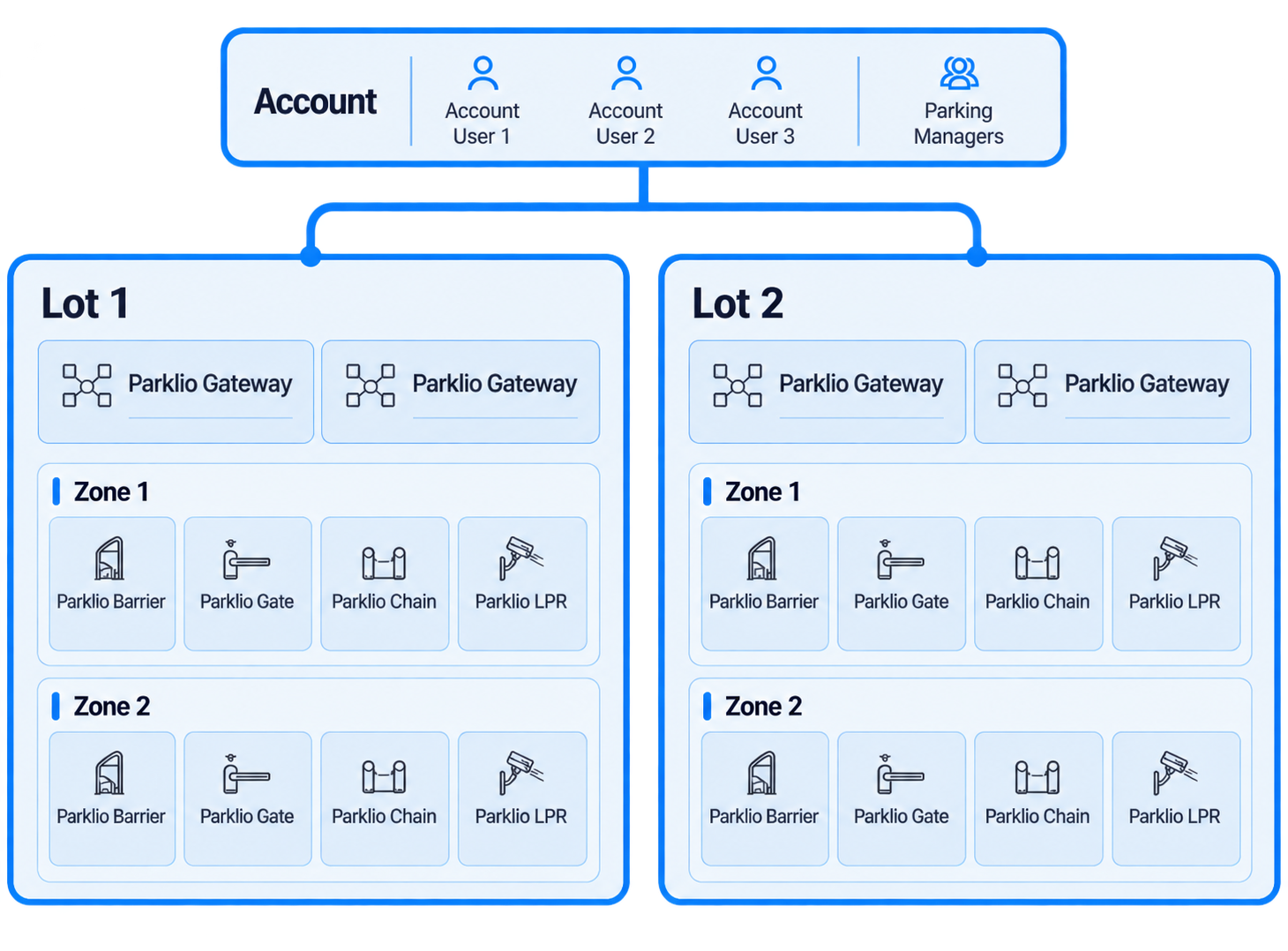
Account Users belong to the Parklio Account and are assigned permissions through account roles. Detailed role configuration and account onboarding are covered in the Account setup page.
Lots and zones
A Lot represents single or multiple parking locations on which you want to integrate Parklio Cloud solutions.
When created, Lots have two default Zones: the default Zone and the handicap Zone. Zones allow the parking lot to be split into smaller entities.
For example, an airport parking lot can be split into different Zones based on pricing, with more expensive and less expensive Zones.
Parklio Products are assigned to Parking Zones, while Parklio Gateways are assigned to Parking Lots.
Products
Parklio Products represent the controllable hardware connected to the Parklio Cloud system. This includes Parklio Barriers, Gates, Chains, Bollards, Brain-connected devices, LPR devices, and other supported products.
Products communicate locally using Bluetooth Low Energy (BLE). Smartphones and Parklio Gateways can communicate with nearby products over Bluetooth.
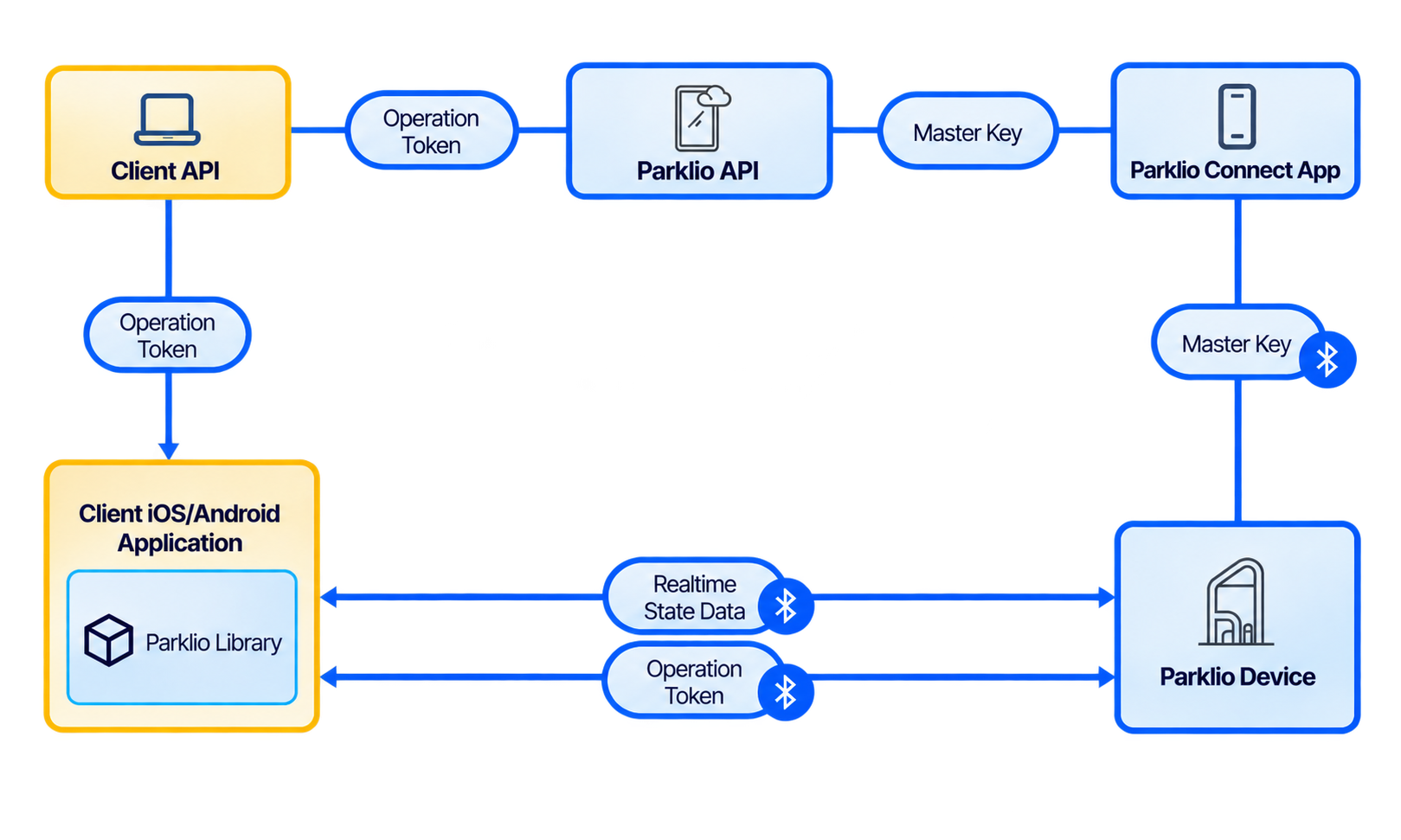
Initial product registration and the exchange of device credentials are handled through the Parklio Connect app and are covered in the Device registration page.
Parklio Gateways
Parklio Gateways provide on-site connectivity between Parklio Cloud and Bluetooth-based Parklio Products.
Because Parklio Products communicate locally over BLE, the Gateway acts as the bridge for remote API communication. It receives device state from nearby products and forwards it to Parklio Cloud, and it delivers remote commands from the API back to the appropriate product.
Gateways are assigned to Parking Lots.
Parklio API
The Parklio API allows applications to communicate with Parklio Products and parking data through Parklio Cloud.
API communication is performed using HTTP requests, while live data is received through WebSockets using Socket.IO v4.4.0.
For Bluetooth-based Parklio Products, Parklio Gateways provide two-way communication between the API and the Products.
See the API overview for details about API communication, Product state, WebSocket events, and command handling.
Parking detection integration
Parking Detection extends a Parklio Account with real-time parking-space occupancy data.
Detection hardware observes parking places and sends occupancy information to Parklio Cloud. Applications can then query the current parking-place state through the API or subscribe to real-time state changes through WebSockets.
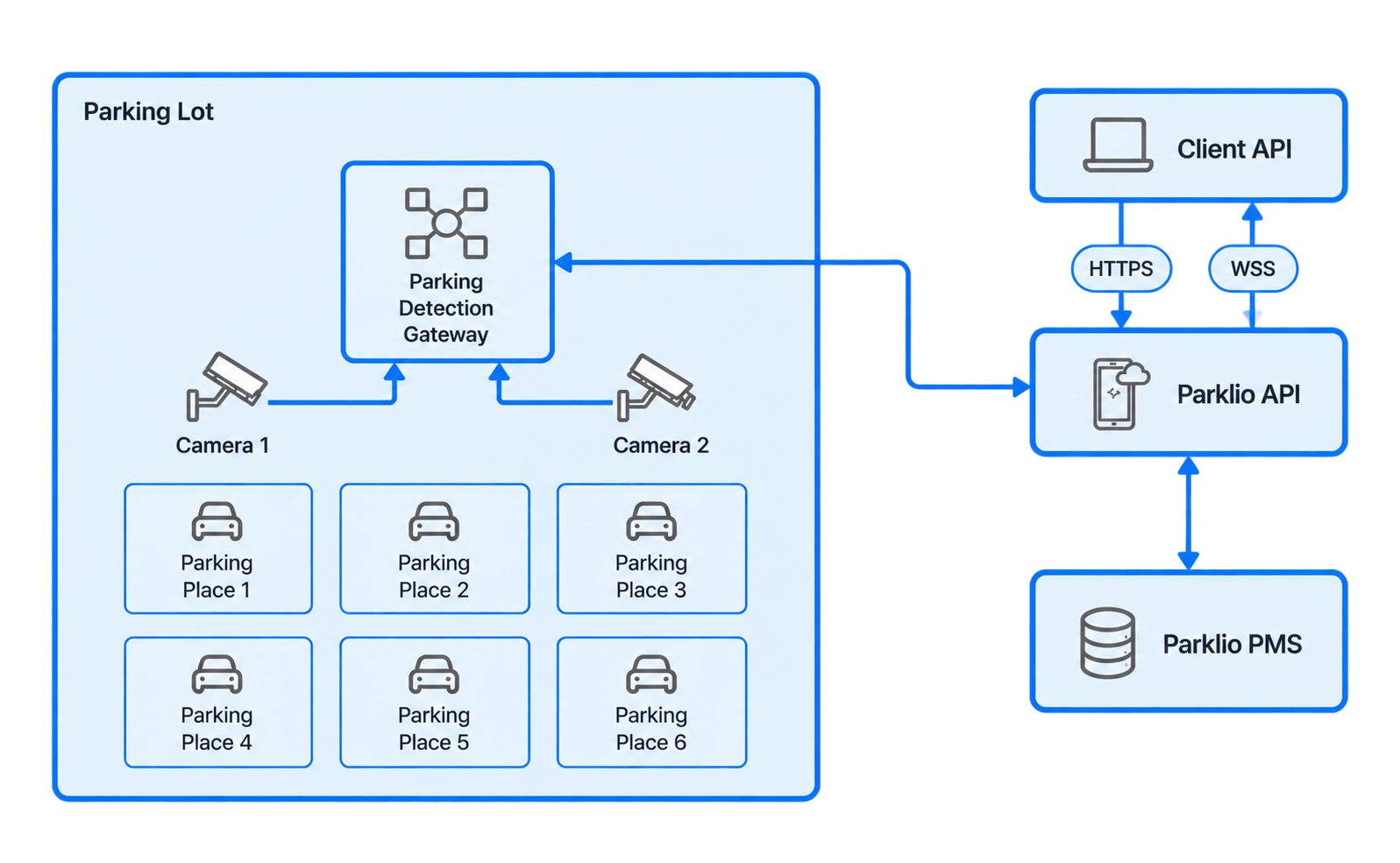
The current state of parking places can be queried using the List All Parking Places endpoint.
For live updates, use the Parking Place State Change Event.
If the Parking Detection Gateway becomes unavailable, a Parking Detection Gateway State Change Event is emitted. During the interruption, the last known parking-place state and camera information remain available.
Parklio SDK
The Parklio SDK provides Android and iOS libraries for applications that need direct Bluetooth communication with supported Parklio Products.
This creates two main integration models:
- Parklio API + Gateway — remote communication through Parklio Cloud and a Parklio Gateway.
- Parklio SDK — direct Bluetooth communication between the mobile application and the Parklio Product.
Products still need to be registered through the Parklio Connect app before SDK communication can be used.
The SDK uses Operation Tokens generated through the Parklio API to authorize actions such as opening, closing, and requesting device status.
The SDK can also scan BLE advertisements from nearby devices to receive information such as open/closed state, battery level, obstruction state, jam state, and device errors.