API overview
API communication
Communication with the Parklio API is established using HTTP requests, while live data is received using WebSockets with the Socket.IO v4.4.0 library.
API endpoints, WebSocket events, and response examples are documented in the API Documentation.
Product state
Every Parklio Product advertises its state using BLE. Depending on the Product type, the state can contain different information.
State shared by Products can include whether the Product is open or closed, whether the time is set, and whether the Master Key is set. Additional information depends on the Product type. For example, a Parklio Barrier can report whether a car is on top of it or whether the sensor is dirty.
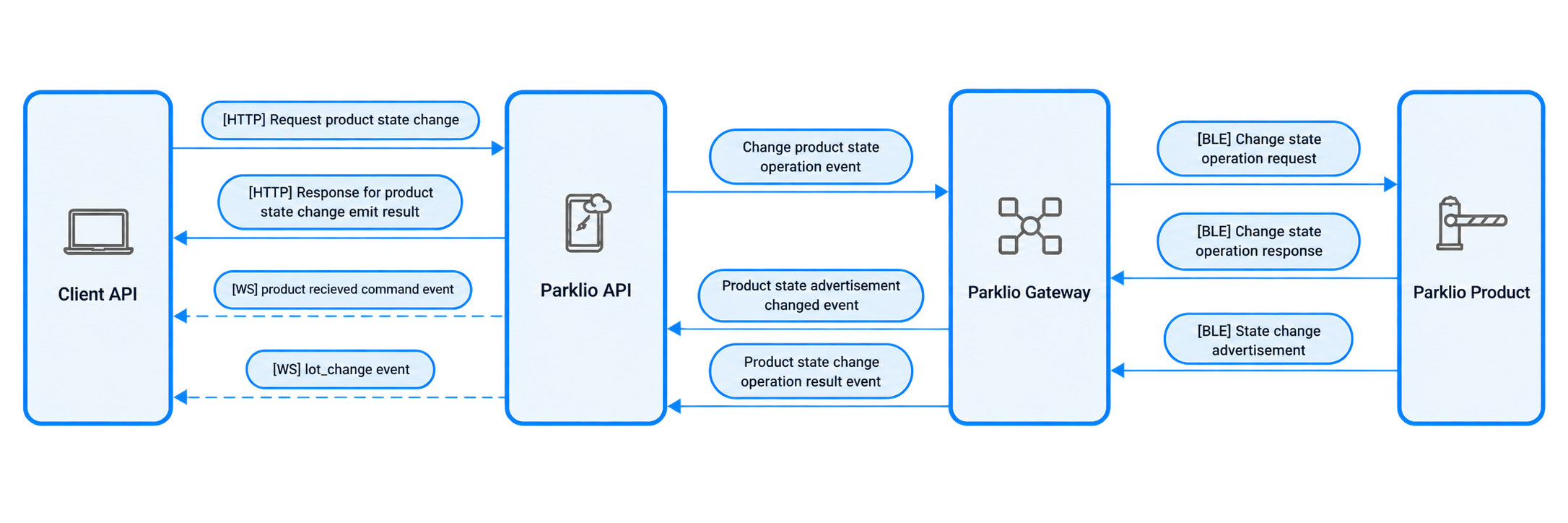
When a Product state changes, the new BLE advertisement is received by the Parklio Gateway and sent to the API for authentication.
Once the advertisement is authenticated, the API updates the Product state and triggers a lot_change WebSocket event to notify connected clients.
See Lot Change Event.
Triggering a Product state change
Clients can change the Product state through the API using the Change Product State Endpoint.
When the endpoint is called, the API calculates the best Gateway for the operation based on BLE signal strength, resource availability, and load.
If a suitable Gateway is found, the API responds with an Emit Successful message and an event_id. This indicates that the command was sent asynchronously to the Gateway.
When the operation is completed, a lot_change WebSocket event is triggered with the corresponding event_id.
If the operation cannot be completed successfully, for example if a Barrier jams while lowering, the API triggers a gateway_error event.
See Gateway Error Event.